LANDING PAGE · WHAT EACH CARD DOES
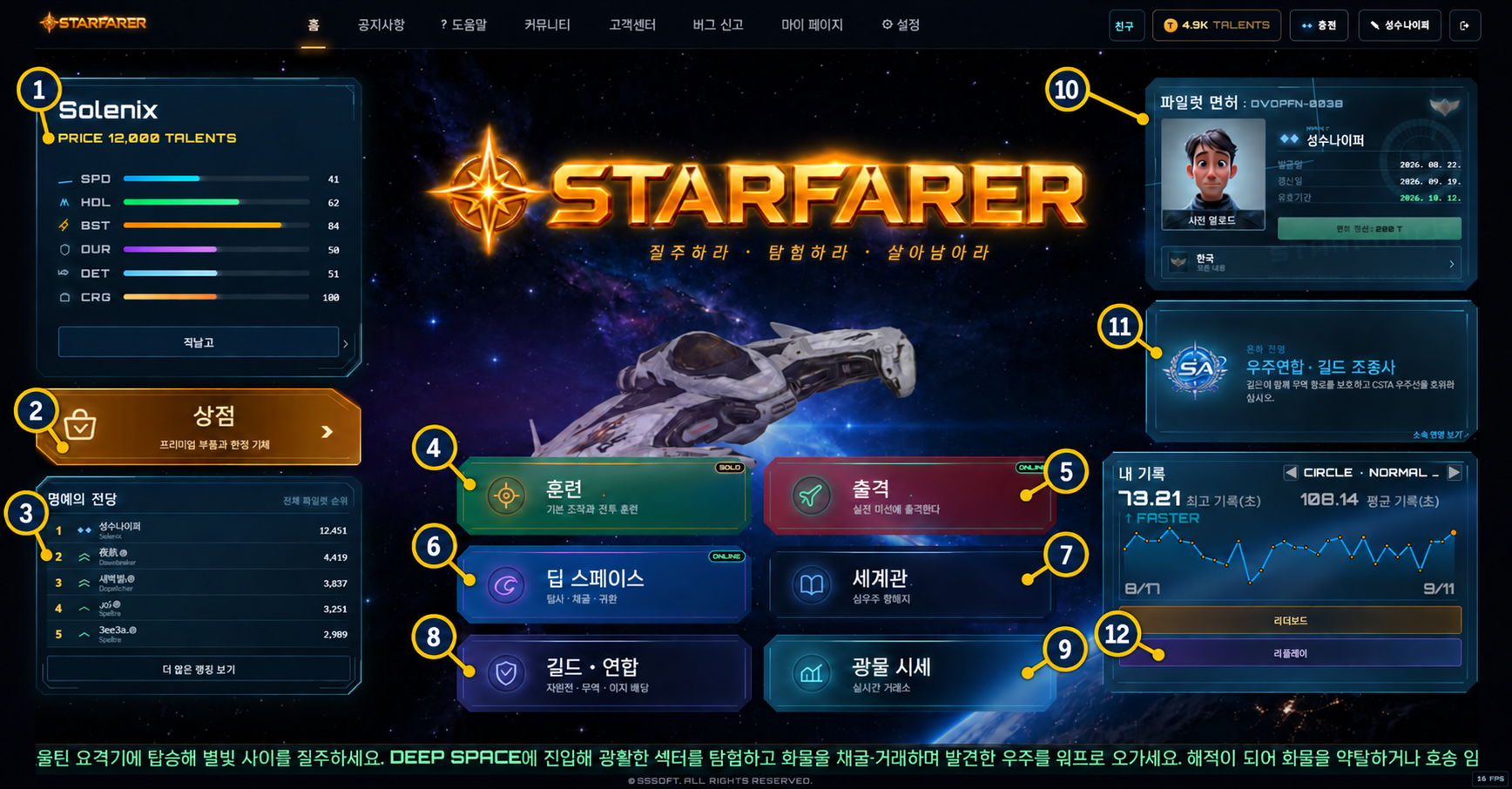
- 1Selected ship and Hangar — shows ship performance and opens ship selection, upgrades and paint.
- 2Store — purchase ships and limited items.
- 3Hall of Fame — compare the overall pilot ranking.
- 4Training — practice controls, racing and combat against AI without a license.
- 5Sortie — enter licensed live racing or battle rooms.
- 6Deep Space — explore, mine, trade, fight and join convoy operations.
- 7World & Lore — read the setting, universes and recovered flight records.
- 8Guild & Alliance — join, create or manage a guild and review territory, trade and dividends.
- 9Mineral Market — inspect live mineral prices before selling cargo.
- 10Pilot License — turn your real photo into a recognizable sci-fi 3D pilot portrait, then issue or renew your license.
- 11Galactic Faction — shows current affiliation and opens the detailed role guide.
- 12My Record — review personal times, leaderboard positions and replays.
CURRENT COCKPIT · FLIGHT GUIDE
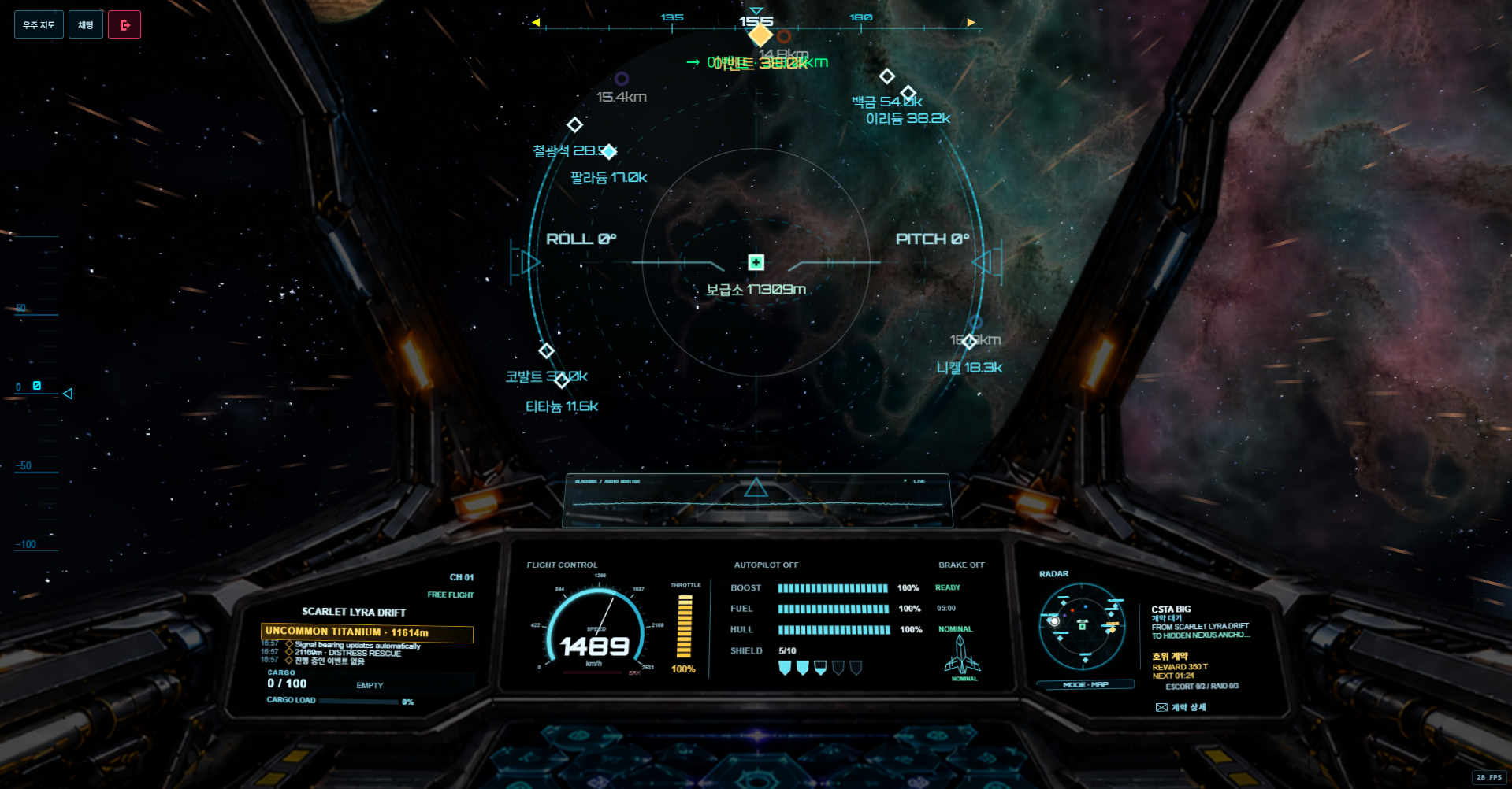
Desktop and large landscape tablets use three instrument panels. Phones and portrait screens use a clear flight view with touch controls. The screenshot shows the current cockpit; numbers 1–6 identify the instruments below.
 123456
- 1. LEFT PANELSector/channel, nearest signal, distance, mission log and cargo load. The yellow line shows the current signal or warning.
- 2. CENTER PANELSpeed in km/h, throttle, boost, fuel/time, hull condition and shield charges. Read flight status here; there is no separate flight-status popup. Active mining, trading or repair can open its work card.
- 3. RIGHT PANELRadar and CSTA route information are separate. FROM is departure and TO is arrival. Before contracting, the localized contract title pulses while booking is available; in the final 30 seconds the title and booking timer turn red. After contracting, mission status replaces the offer; CONVOY HULL appears during an active mission. The envelope opens contract or mission details.
- 4. RADAR · MAP / ALTMODE below either radar switches the same setting. ALT / SUPPLY BASE uses the station as its center and zero altitude. Lines connect each marker to its footprint; signed heights are relative to the base. Nearby matching contacts share a counted label; crowded labels move or are omitted with a count. Expand the radar for more space.
- 5. RETICLE / ATTITUDEThe sight shows pitch and bank. When another craft locks onto you, the blue reticle turns red. An incoming missile flashes its distance and approach track in the center panel’s fuel/hull area.
- 6. BLACKBOX GLASS HUDThe transparent rectangle above the center panel shows live game sound waveforms and recent sound strength. It includes engine, effects and game music routed through the audio mixer. It is an audio monitor, not a recording or microphone.
- DARK SPACEALT mode is disabled in dark space. Lost navigation signals do not keep showing the previous sector as a known destination.
- MOBILE / PORTRAITThe cockpit bitmap and desktop panels are removed. A single clear flight view uses drag steering and touch buttons for boost, brake, shield, lock, follow, missiles and interaction. Use in-game chat. Larger landscape tablets can retain the cockpit.